Findings: Register
Small Changes, Big Wins
How design for the Findings Register page grew over multiple iterations to further provide value for users
Summary
The platform aims to be 'insight-driven'—delivering value by helping organizations clearly understand their security posture, rather than leaving users to interpret large volumes of data on their own.
Challenge
How might we improve the use of space on the findings' listing page to build context and provide value to the user?
Research
User Interviews
Visual Design
UX Design
Usability Testing
Team
1 Stakeholder (CEO), 1 Product Designer (Me), 1 Frontend Dev, 1 Backend Dev
My Role
I was responsible for collaborating directly with stakeholder (doubling up as PM) to derive a design solution, as well as drive collaboration between design and engineering to ensure the success of this feature.
01
Initial Improvement
Before
Findings: Listing v2.0 provided an initial upgrade to the listings page.
At the MVP stage, the listings page provided its rudimentary function—a register of all findings created for the organization. As the platform matured, we wanted to further enhance the value that the listings page could provide to organizations.
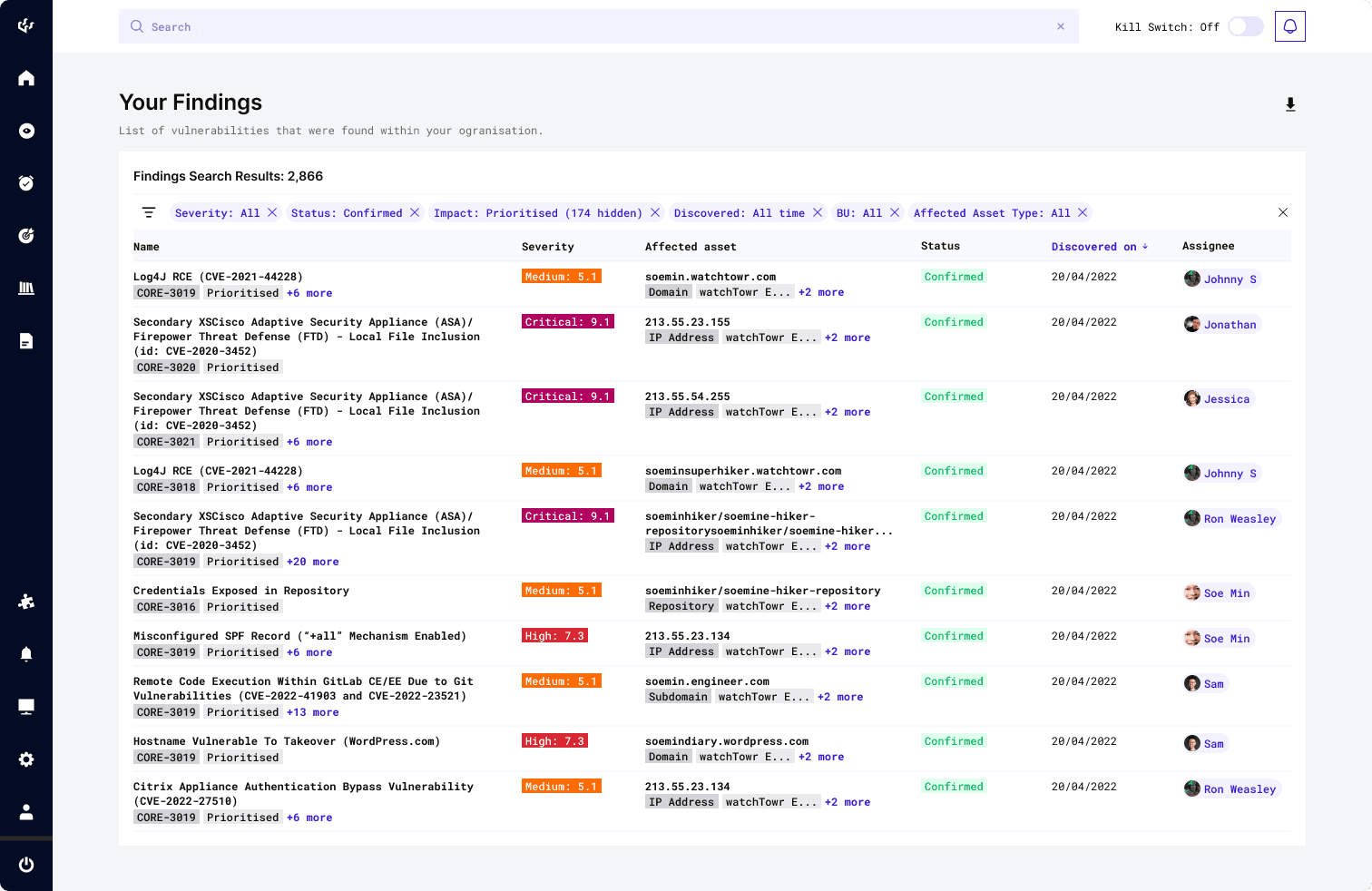
Findings: Listing v1.0
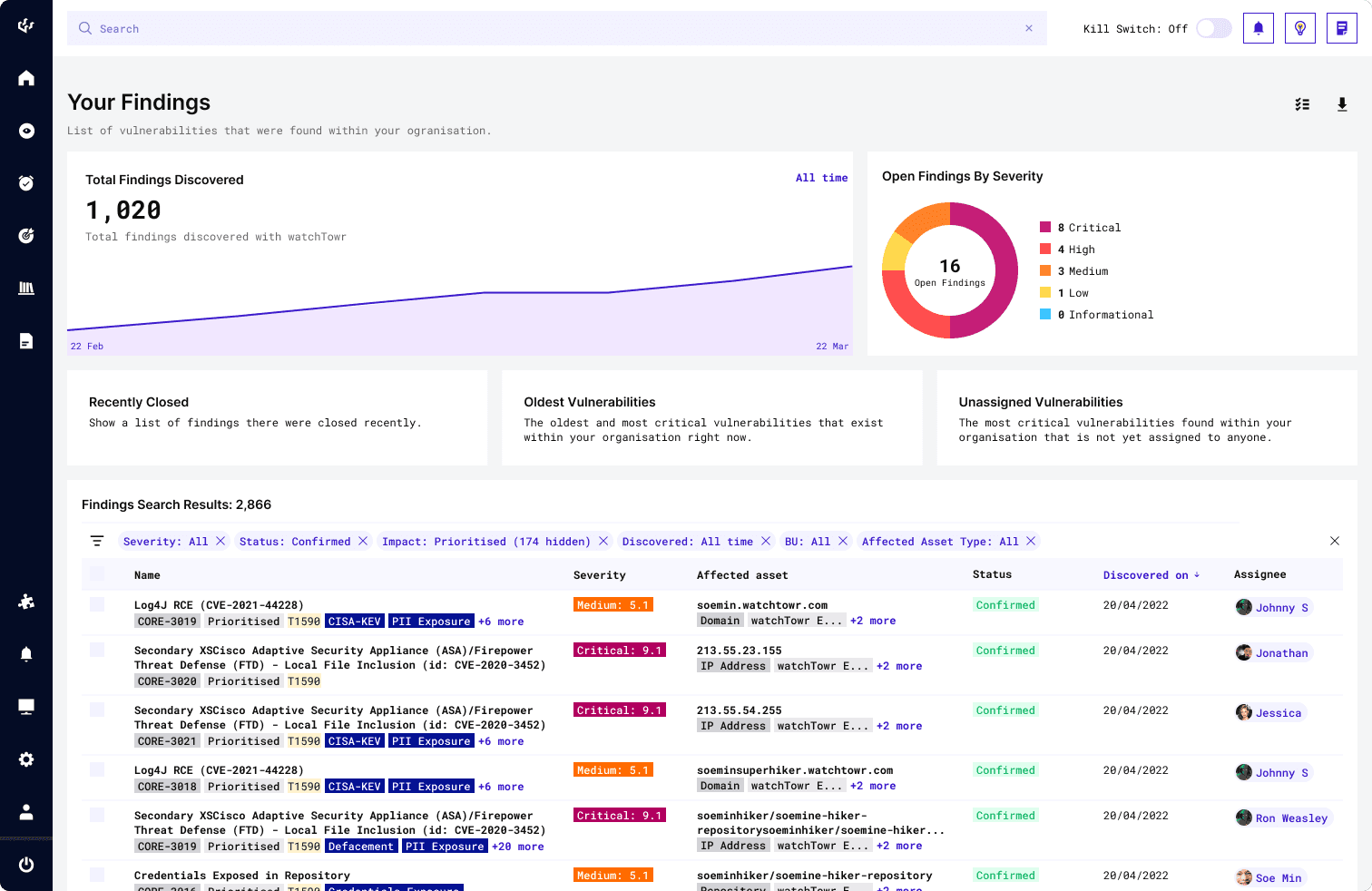
Findings: Listing v2.0
In the second iteration of the listing page (i.e. Listing v2.0, screenshot on the right), the following improvements were made:
Improvement 1
Providing quick actions to filter findings by
With the user research, I learnt the important use cases that needed to be available to users conveniently were 'Recently Closed Findings', the 'Oldest Vulnerabilities' in their attack surface and 'Unassigned Vulnerabilities' in their organization, which I manifested as quick-action filters.
Recently Closed Findings
Tracking recently closed findings verifies effective remediation and prevents recurrence. Following remediation, these findings are often accessed for various reasons.
Oldest Vulnerabilities
Identifying the oldest vulnerabilities highlights persistent risks that may indicate stalled remediation efforts or overlooked critical assets.
Unassigned Vulnerabilities
Similarly, unassigned findings may sometimes slip through the gaps of remediation efforts, risking prolonged exposure while no one takes responsibility.
Making these categories of findings easy reachable by users through the use of quick filters ensures that all findings are accounted for, preventing the likelihood for breaches to occur due to lapses.
Improvement 2
Providing key summaries of important finding-related information
Adding a graph denoting the trends of vulnerabilities found provides a quick insight to the organization's security posture over time. Additionally, having a breakdown of the organization's findings by severity (i.e. Critical, High, Medium, Low, Informational) is essential as it is a direct translation of technical data into business risk and remediation priority.
This essentially drives risk-based prioritization, which is the core foundation of threat remediation. Every finding created is a task needed to be looked into, but with severity prioritization and quick filtering, engineers can allocate limited time and resources to focus efforts on findings that pose the highest immediate risk of exploitation to their attack surface.
02
The Solution
Development
More metrics and parameters were added to findings—further supplementing users with various avenues to dissect finding data.
As the platform's capabilities matured, we were able to include more data attributes into finding entries, further providing users with more information (and context) regarding specific vulnerabilities.
Over time, UI real estate became increasingly precious—we needed to deliver more and more data in the same (or less) space.
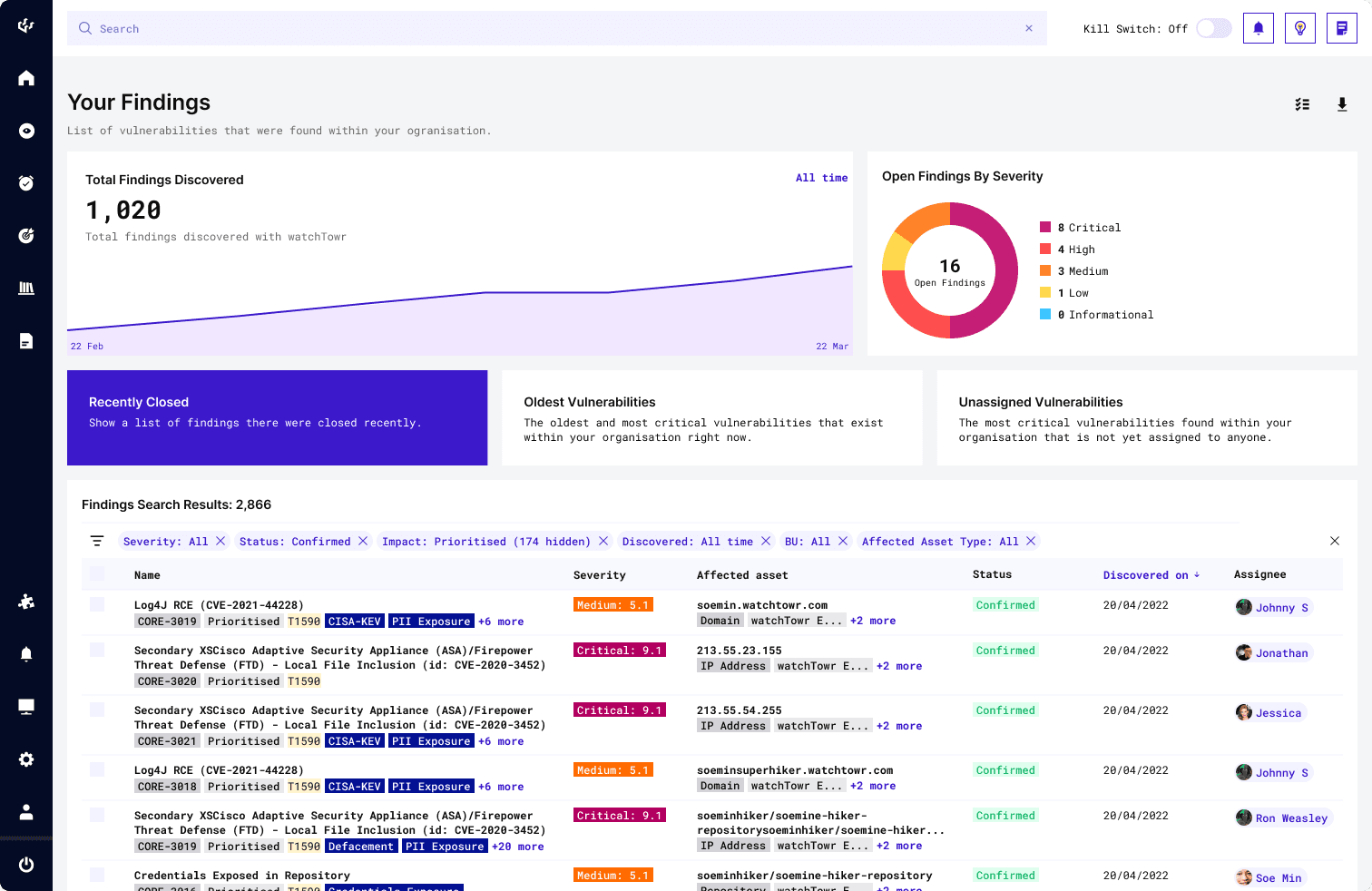
Findings: Listing v2.0—'Recently Closed' quick filter active state
In Listings v2.0, space usage in design proved highly inefficient: metrics and quick filters consumed half the page, pushing the core of the UI—the listing table—to the bottom half. Over time, as we added more metrics, the need for better space efficiency became clear.
After
Introduction of vulnerability impact tagging to findings presented a timely opportunity for a redesign of the listing page's insights section.
Findings: Listing v2.0—'Recently Closed' quick filter used
Improvement 1
Reshuffled and readjusted layout to cater for more value in less space
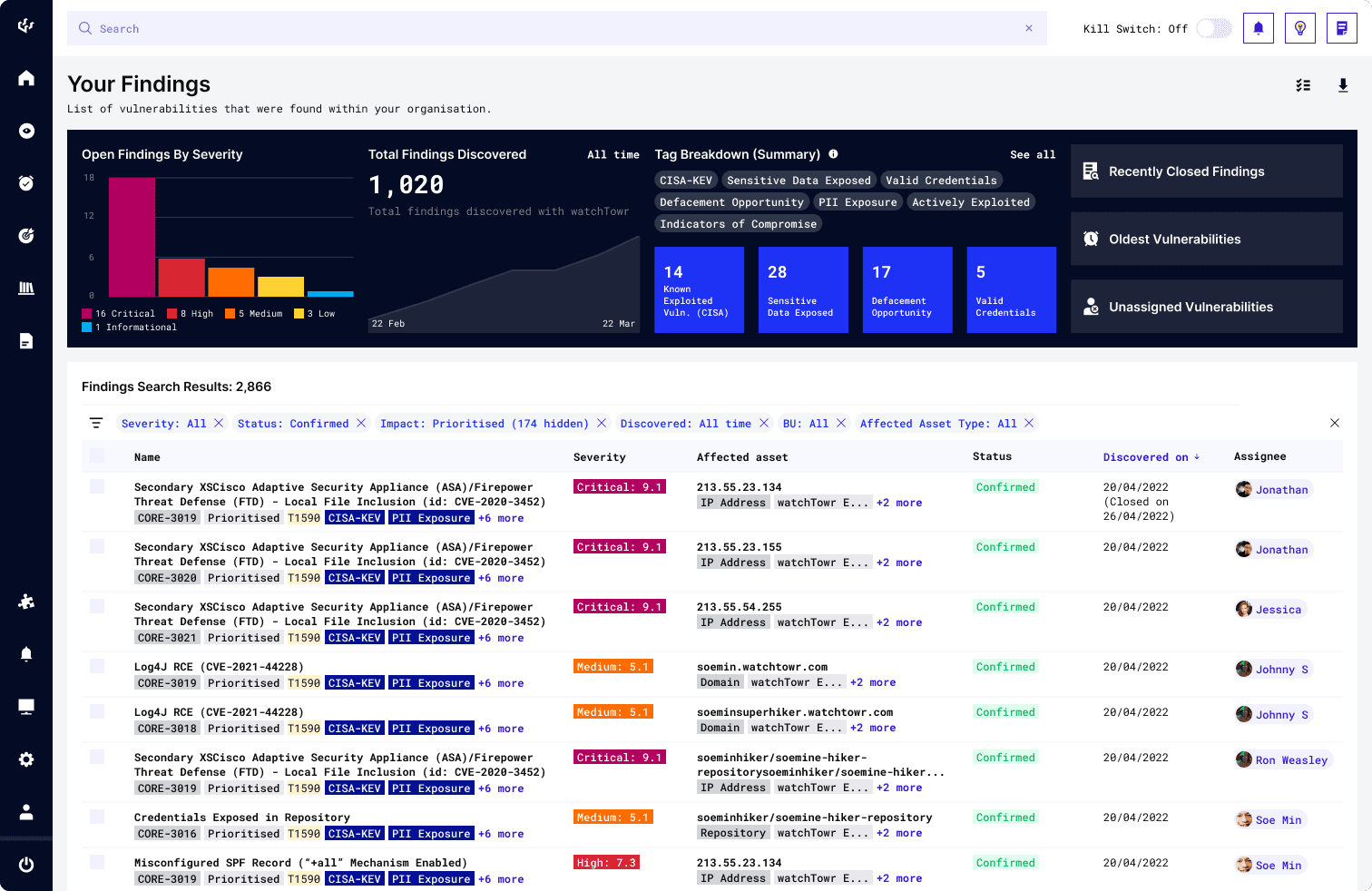
To maximize space efficiency, the insights section now delivers more data and impactful insights in less space—providing greater value without overwhelming the page.
Improvement 2
New Addition: Findings had 'Vulnerability Impact tags' added to their attributes
With the new impact tagging attribute, users gain clearer context on how vulnerabilities affect the organisation and potential attack vectors targeting their attack surface. In the insights section, these tags also serve as quick-action filters, enabling faster access to specific findings—potentially reducing the Mean Time to Remediate (MTTR).
03
Considerations
Covering Bases
Early and frequent collaboration with cross-functional teams is essential to the feature's success.

Earlier Iteration of the Findings: Listing v2.0 Insights Section

Close-to Final Iteration of the Findings: Listing v2.0 Insights Section
Ensuring Feasibility - For instance, the insights section was intended to display finding counts by their respective impact tag, sorted in an ascending order. Discussions with engineering revealed this query would load too slowly, harming page performance and user experience.
Improving Data Visualisation - Swapped a donut chart for a bar chart to improve readability at a glance, making it easier to identify which severity category has the most open findings with less ambiguity. This improves clarity in assessing the organisation's security posture at a glance, helping prioritise remediation efforts.
Balancing UX, scalability, and design debt is an ongoing challenge—especially in a startup environment where sprint timelines are tight and feature roadmaps are rarely set in stone. With each feature, I do my best to design with the future in mind (e.g. in a scalable or modular way), knowing the UI will continue to evolve as the platform grows. It's a constant effort to find that balance, and something I refine with every sprint keeping the tradeoffs in mind.