Preemptive Exposure Management:
Redesigning the Hunts experience
How I solved user pain points in watchTowr Platform's pioneering intelligence feature: Hunts
Summary
Instead of helping users understand potential threats, the Hunts feature often creates confusion, resulting in a significant increase in administrative support requests.
Challenge
How might we improve the clarity and intuitiveness of Hunts so users can easily understand emerging threats and act to protect their organisation?
Research
User Interviews
Visual Design
UX Design
Usability Testing
Team
1 Stakeholder (CEO), 1 Product Designer (Me), 1 Frontend Dev, 1 Backend Dev
My Role
I was responsible for collaborating directly with stakeholders, as well as functioning as PM to drive collaboration between SDRs, design and engineering to ensure the success of this feature.
01
Understand
Context
"By the time a vulnerability hits the headlines, it's already too late."
In the current world of cyber, speed of attacker exploitation is rapidly increasing. New vulnerabilities may be weaponised in a matter of hours (some observed as little as ~4 hours) and as a result, traditional vulnerability management/patch-cycles are gravely falling behind.
'Hunts' - from the detection and response world of 'Threat Hunting'— exists to give client organisations an edge by identifying exploitable systems early and preemptively, thereby placing them in a better position for early remediation before breaches occur in their attack surface.
Problems
Unfortunately, the current Hunts experience is unintuitive and not as effective as intended.
At the MVP stage, the hunts experience sufficed by providing a rudimentary avenue for threat hunting research and proof-of-concept to take place. But as we scaled fast with clients of varied cyber maturity, issues faced by users inevitably increased, and as a result - so did ours:

Hunts v1.0 (existing Hunts UI created since MVP)
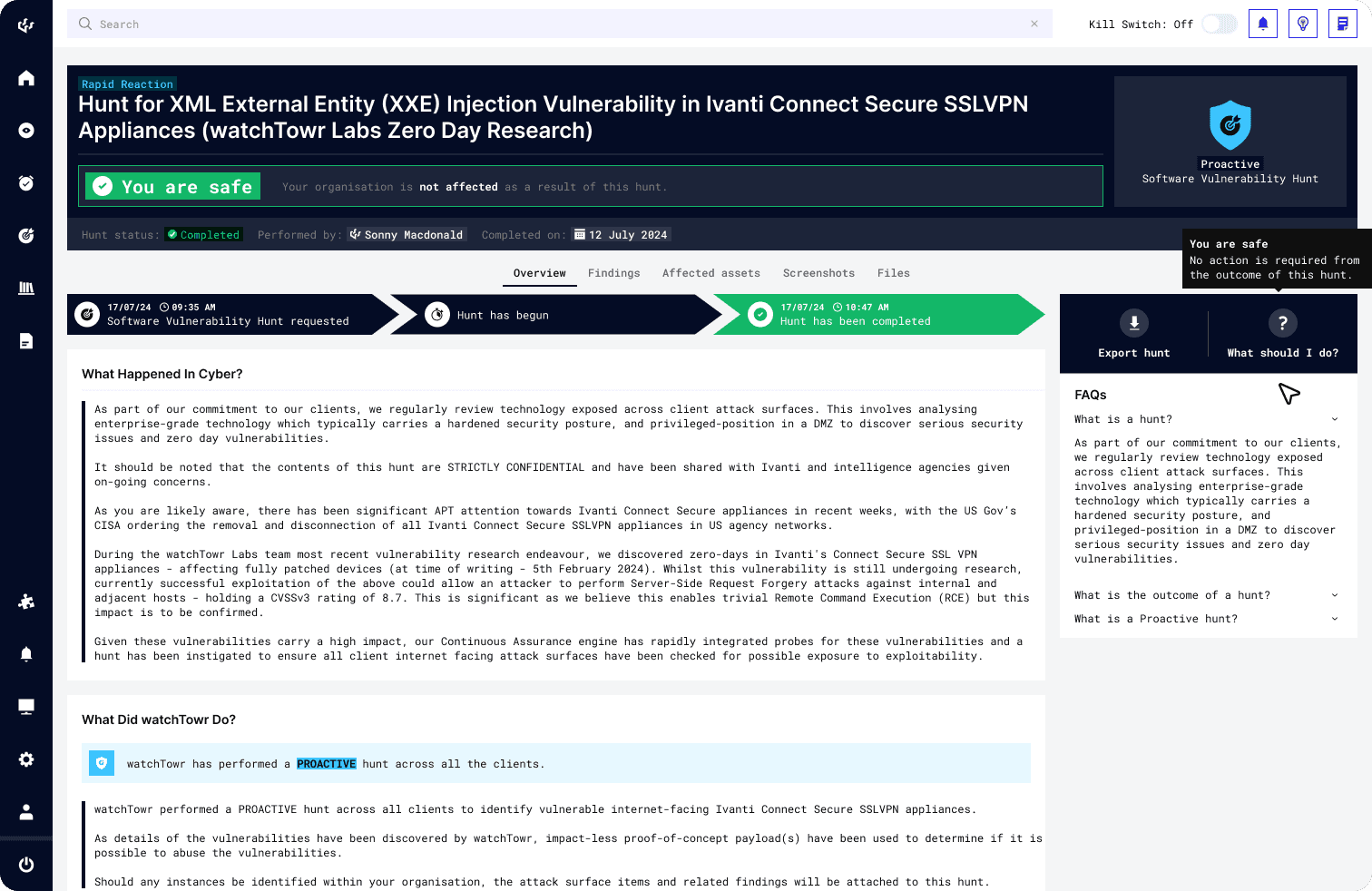
Unintuitive and vague: When presented with the page, CISOs aren't sure of what insights to draw from it, or what they can conclude from the UI. Statuses like 'Completed' or 'Completed with Results' often invoke a 'What does this mean' confusion in users.
Lack of clarity: When cyber engineers have hunts delegated to them, it is not clear to them how they should proceed with remediation (or if it's even necessary) without seeking clarification regarding its status (non-technical clarification request)
Visually bland: SDRs reported a perception gap: despite Hunts being a key offering by watchTowr, the current UI looks uninspiring and does not adequately communicate the feature's true value to potential clients.
User problems
For organizations using Hunts, a lack of clarity in the UI creates a frustrating triage experience for cyber teams, resulting in precious time lost in remediating potential threats to their attack surface.
Business problems
Client confusions lead to more administrative load for the team, resulting in productivity loss via time spent clarifying these confusions that could be spent on more crucial cyber-related tasks.
Discovery (Highlights of UXR)
Research showed that the Hunts UI needed to cater to 2 key user groups: Company CISOs and Cybersecurity Engineers.
Useful usage patterns I noted:
CISOs
CISOs require the high level view of the hunt - summaries, key insights, bottomline. Thereafter, they will delegate the hunt to their engineers for monitoring and remediation (where necessary).
Cybersecurity Engineers
Upon delegation, cybersecurity engineers require ample details regarding the hunt to assess and remediate. At times, the user who made the hunt request was not always be the user monitoring the hunt.
Key questions often asked by users:
What is this? What does this mean (for me)?
Am I (is my organisation) affected by this? Do I need to be concerned?
How am I affected?
What do I need to do next?
How do I fix it?
Knowing this was highly beneficial because it gives me a clear yardstick for evaluating the success of my final solution—namely, whether the updated UI resolves these confusions and pain points.
02
Gain Confidence
Analysis + Ideation
This called for an audit of the existing UI—to prune, reposition or supplement - so it tells our users what they need to know seamlessly.
I worked with the internal cyber team to evaluate what information on the UI was truly necessary based on the core user journeys. From these insights, I built an information hierarchy, prioritised the content, and explored multiple concepts for the refreshed UI.
Together, we discussed the pros and cons of each direction, and over multiple iterations, converged on a model that would best serve the combined user groups' needs while also supporting the design direction that the platform is moving toward.
As I progressed along iterations, I made strategic adjustments to further prioritise learnability and ease of adoption, with the consideration that we were scaling up fast and would continually see an influx of new users.
Iteration
With research insights and qualitative data, I worked closely with stakeholders to refine and iterate on design concepts aimed at resolving user pain points through UI enhancements.
Improvement 1
Layout improvements to prioritise key information and user autonomy
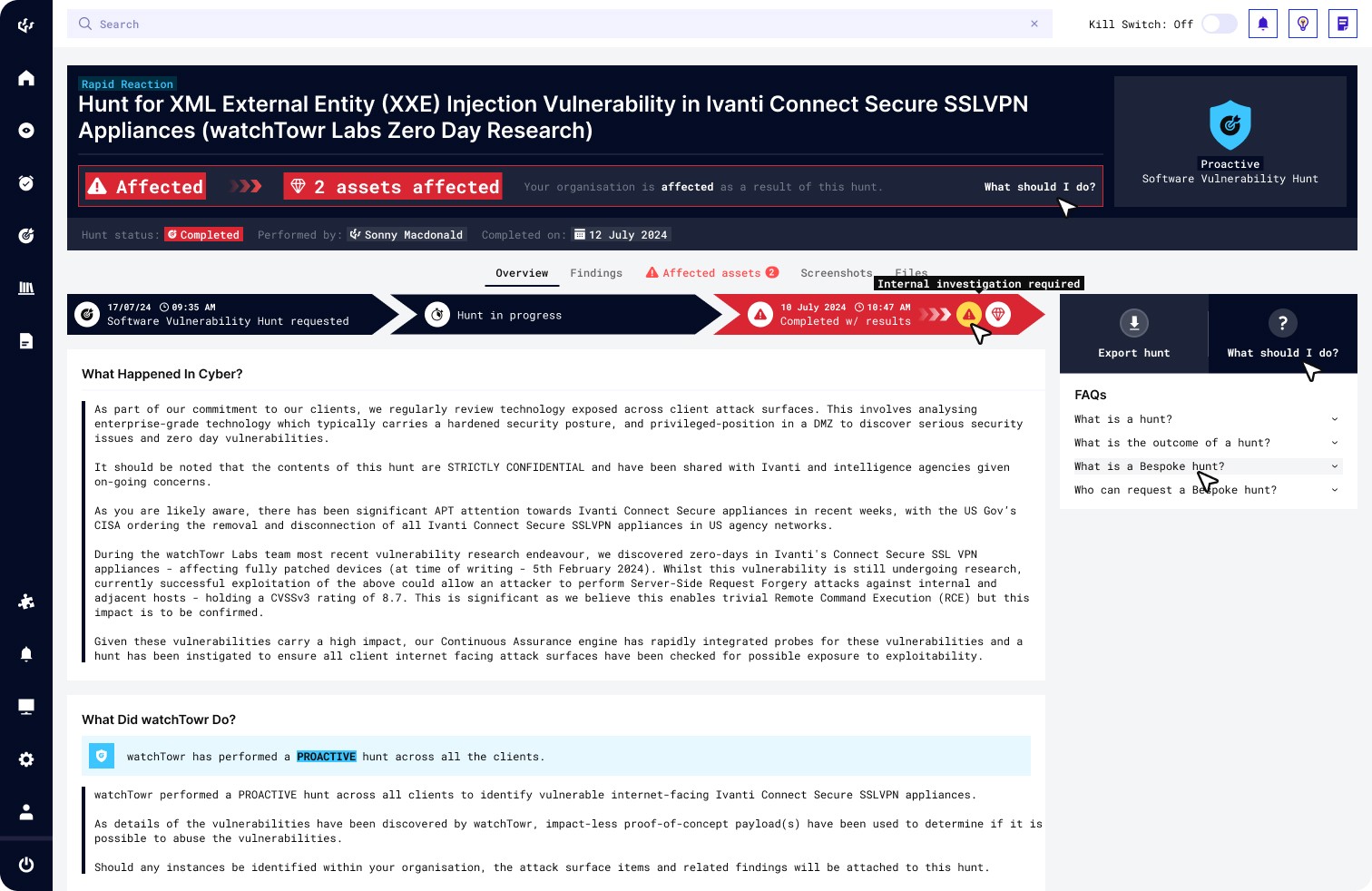
To address pain points, the header section was redesigned: streamlined to highlight the key insights users needed to understand at a glance, while adhering to the overall design direction the platform was heading toward. Space was also reallocated for user-guidance elements, making instructions and contextual cues more visible and accessible throughout the interface.
Improvement 2
Redesigning hunt statuses for clarity and real-time insight
The status system was redesigned to provide clear, actionable insight into each threat hunt. Previously, statuses only showed “completed” or “completed with results,” which left users unsure about what the outcome actually meant. The new statuses explicitly communicate whether the organisation is safe or affected, removing ambiguity and reducing the need for additional clarification.
We also introduced live, in-progress updates. As a hunt runs, users can now see findings appear in real time, allowing them to assess potential threats and begin remediation immediately—rather than waiting until the entire hunt has finished.
Improvement 3
Providing more entry points for user guidance
User-guidance elements were added to the interface to improve learnability and ease of adoption. By clearly addressing the common "What should I do next" questions, the UI now supports greater user autonomy and reduces the need for external guidance.
Improvement 4
Adding visual hierarchy for a clearer hunt narrative
The original design lacked visual hierarchy and did not convey a clear story, making it difficult for users like CISOs and engineers to understand the status and progression of the hunt. The updated version introduces structured visual cues that highlight progress, outcome and clear next steps.
03
Polish & Deliver
Final Design
Key UI enhancements included restructuring the Hunts layout, strengthening user guidance, and rebalancing visual hierarchy around essential information.
04
Results
Success
Despite constraints and scope creep, the update was delivered in time for SDRs to include into pitches at the upcoming cyber-conference 🎉
The update was an overall success.
Successful launch - Updated Hunts experience delivered on-schedule, as targeted to be ready for the upcoming cyber-conference.
Reduced support tickets - As we monitored over 1 month (4 sprints), the team noted a drop in Hunt-related confusions and queries, even with the onboarding of new client organisations.
Improved remediation reaction time - Feedback from already existing clients showed that they were able to react to findings quicker as the cues were a lot clearer than before.
Perception gap improved - SDRs shared that they were more confident in pitching Hunts to potential clients, receiving positive feedback when doing demos.
05
Considerations
Covering Bases
For a successful feature launch, these considerations were addressed across various stages of the design process.
Systems Thinking - Design should cater for various layers of users in an organization including sub-units (e.g. Business Units) or role-based access control (RBAC) structures. These factors influence how different user roles interact with the system, shaping the required use cases.
Cascading Effects - Similarly, when a feature or a data element of the feature (e.g. hunt status) is updated, it's essential to account for how these changes will cascade across the platform. Any pages or components that reference information from Hunts need to be updated accordingly to ensure platform consistency.
Early & Frequent Collaboration - To ensure minimal surprises, I make sure to communicate design direction and key changes to the dev team early and frequently.
Scope Creep - Finally, while we always aim to give the best version of the feature possible, it's important to be upfront about timelines and resources—weighing effort vs. impact to progress iteratively if necessary.
Back to Top