Insights in Motion:
The Attack Surface Dashboard
Evolving the watchTowr platform's Attack Surface Dashboard — from numbers on a page to insights in motion
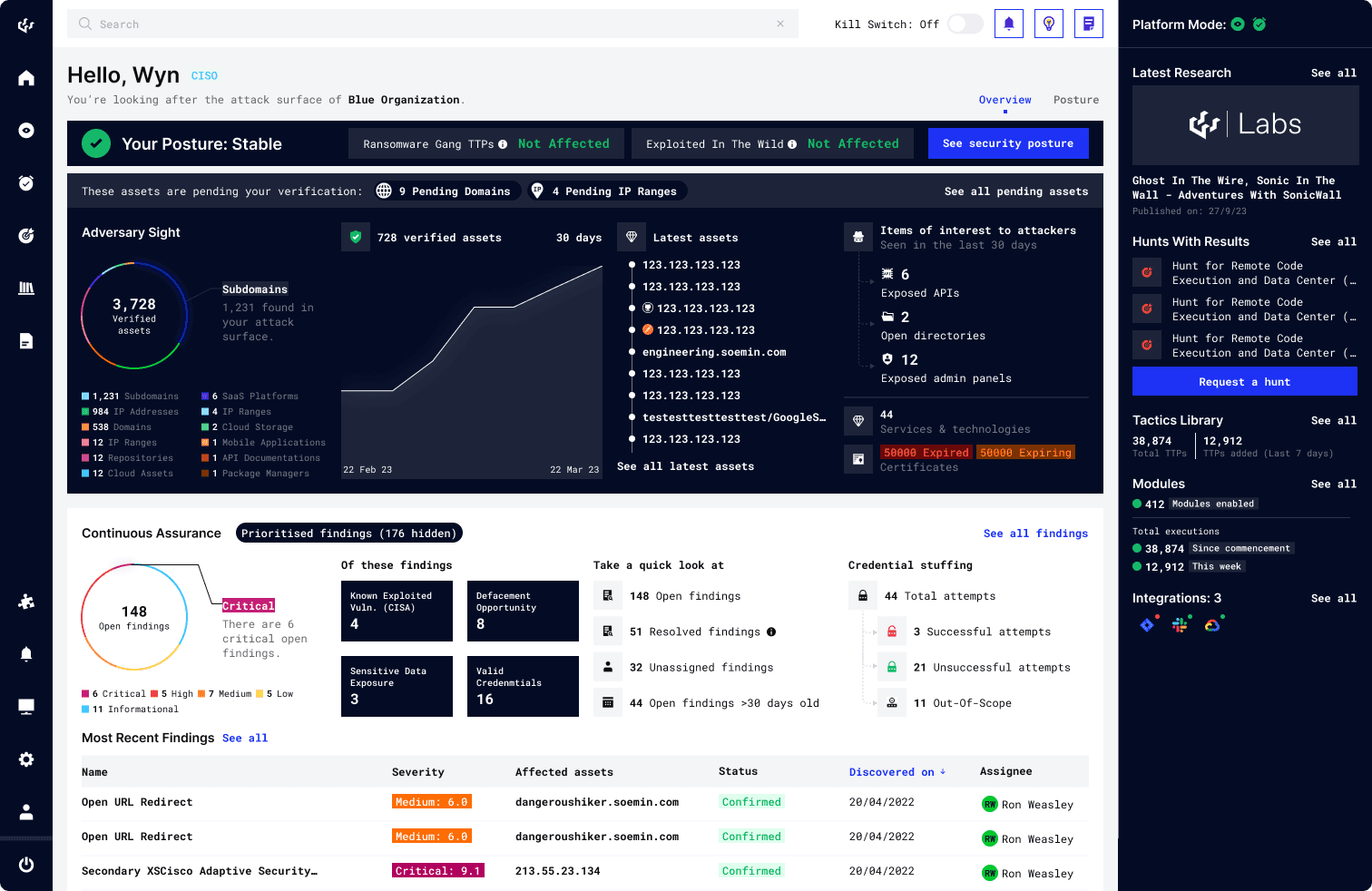
Dashboard UI v3: Latest Release
Summary
The dashboard is the core of the EASM platform—the central hub where everything connects, and the user's first touchpoint into the platform. As capabilities evolve, the dashboard continues to grow in sophistication, ensuring users always have a clear view of what matters most.
Challenge
How might we enhance the dashboard to reflect our platform's growing sophistication, so as to deliver greater value to the user?
Research
Dashboard Design
User Interviews
Data Visualisation
UX Design
Usability Testing
Team
1 Stakeholder (CEO), 2 Product Designers (Me+Senior Designer), 2 Frontend Dev, 1 Backend Dev
My Role
I was responsible for collaborating directly with the stakeholder (doubling up as PM) to derive a design solution, as well as drive collaboration between design, engineering and the cyber team to ensure the success of this feature.
01
MVP
Creating the Dashboard
We built the Attack Surface Dashboard around our users, consolidating all key information into a single view to provide a clear understanding of their organisation's security posture.
I identified our key users (CISOs, Cybersecurity Engineers) and established a foundational understanding of their needs (e.g. Status Check, Remediation Prioritisation). From there, I defined key user stories and mapped out core user journeys that shaped the dashboard's structure. For example:
As a CISO, I want to know..
How many assets does my organisation own?
What kind of assets are they?
Are there currently any open findings? How many? What severity?
What do I need to be concerned about?
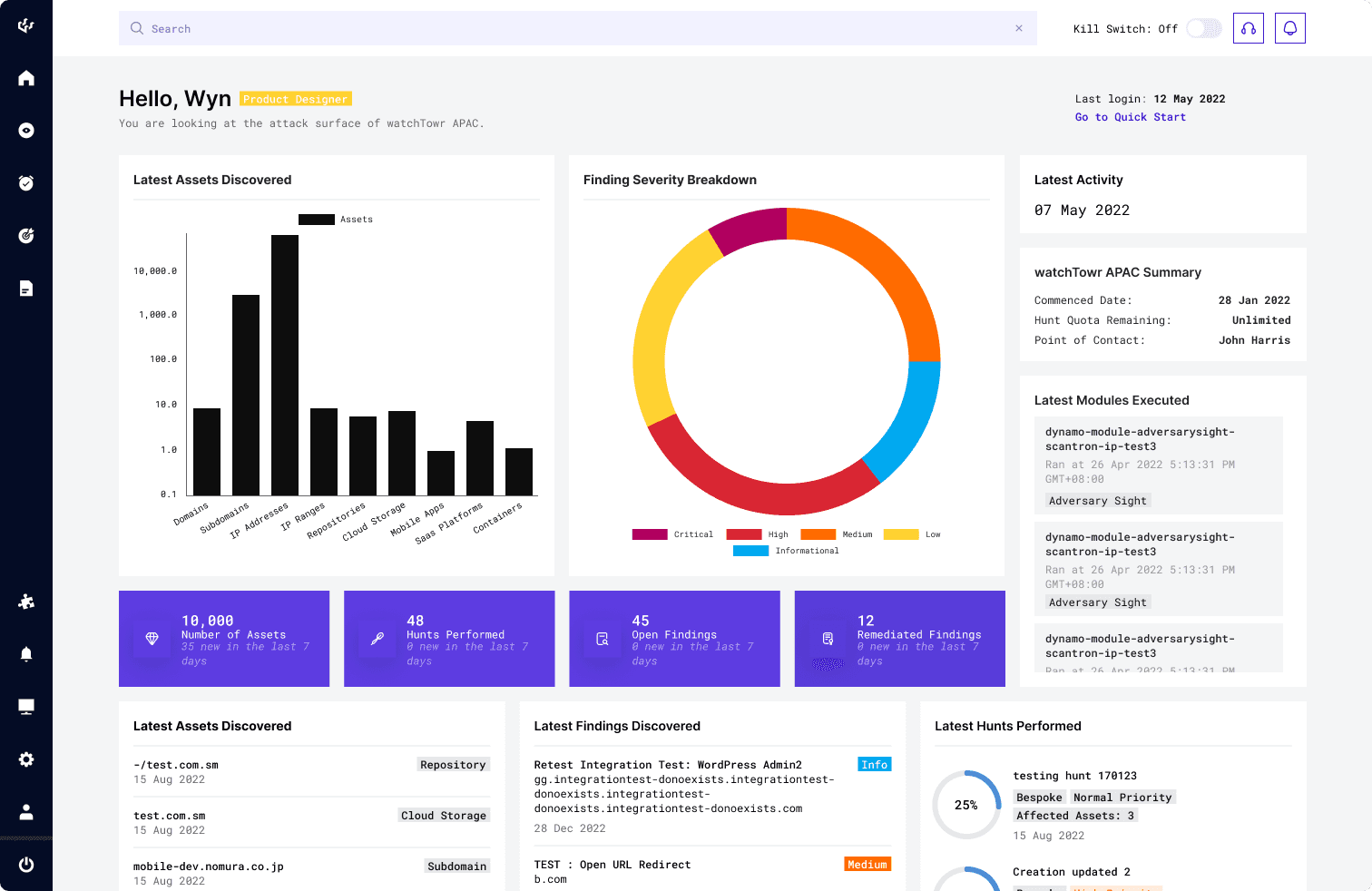
Attack Surface Dashboard v1: First Ever Version of the Dashboard (2022)
02
A Leap Forward
Evolving the Attack Surface Dashboard
Building on this, the UI v2 overhaul focused on improving space efficiency and designing a clearer flow to answer the overarching question: “How can my organisation be compromised today?”
Better use of space, more detailed metrics, and easily accessible quick filters give users context quicker and with more clarity when assessing their organisation's attack surface — helping them pinpoint and prioritise remediation efforts more efficiently.
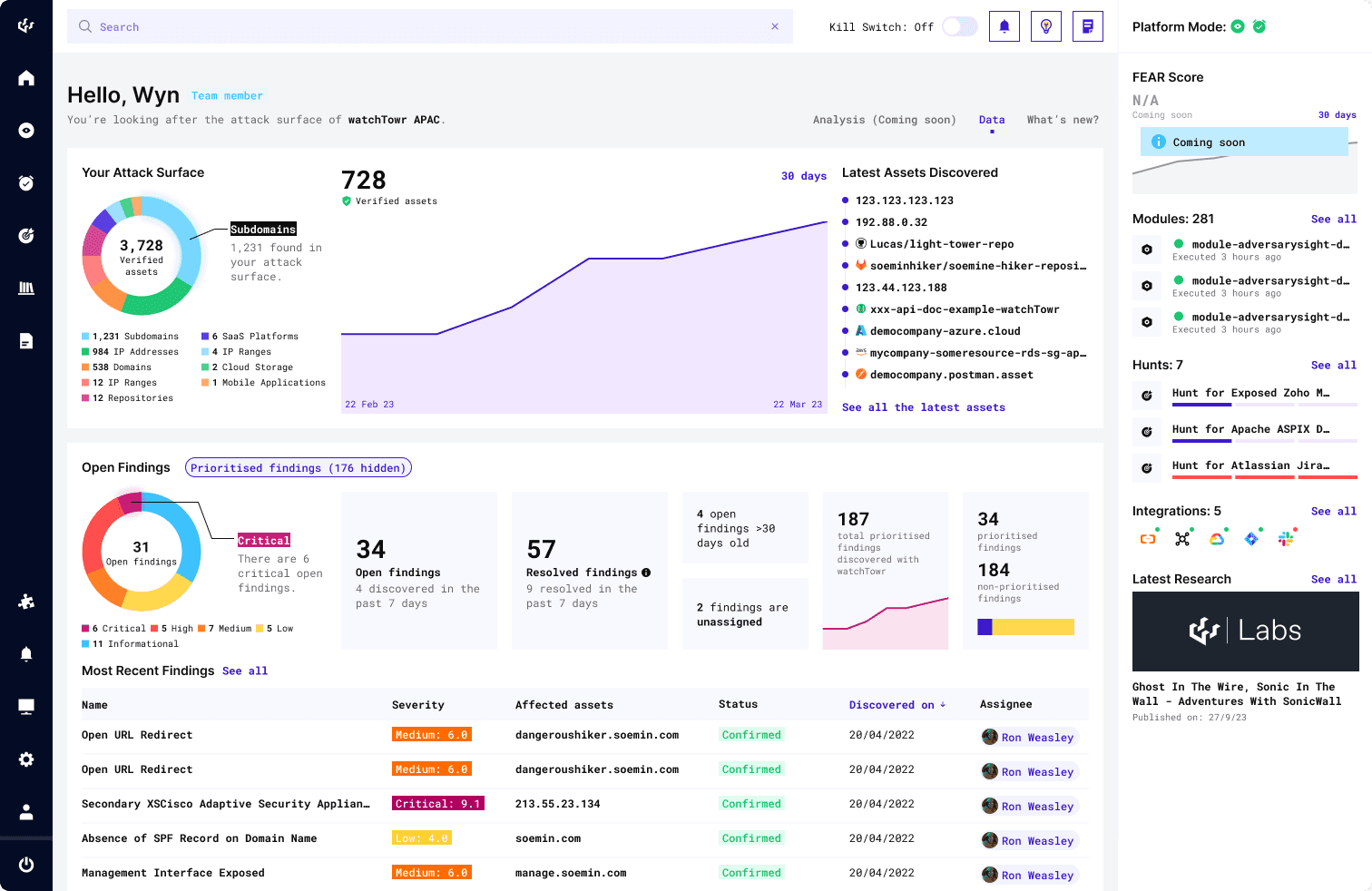
Attack Surface Dashboard: v2 update (2023-2024)
Redefining the flow of the dashboard began with understanding the story we needed to tell. What did our users truly need to know about their attack surface? What are their priorities? What's (important that's) changed since they last logged in?
Research conducted with our cyber team informed the intentional placement of data on the dashboard, reflecting the priority of information users need when they first log in. Guided by key user stories, each element placed helps users narrow down and prioritise remediation efforts — ultimately working toward keeping their organisation secure. Working closely with stakeholders, I redesigned version 2 into a more 'insight-driven' experience, telling a story rather than just raw 'data on a screen'.
UI v2 Update 1
Clear segmentation & the Law of Proximity
I redesigned the flow to clearly distinguish the platform's core functionalities: Adversary Sight and Continuous Assurance, encapsulating them in their own separate section as each delivers unique insights and value to the user.
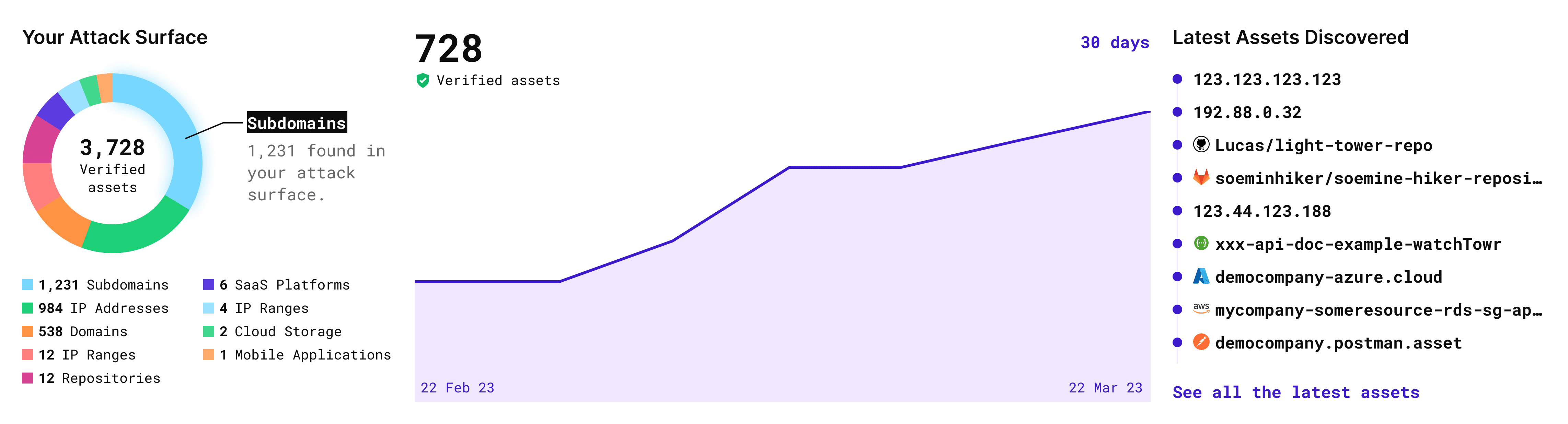
Adversary Sight section: Your Attack Surface, UI v2
On the platform, Adversary Sight is the engine that rebuilds the organisation's external Attack Surface in the way a real attacker would see it — it keeps discovering and tracking assets that belong to the organisation (e.g. IPs, apps, SaaS, cloud etc.), rather than just what they think they own.
This update enables quick scanning of the organisation's overall asset data and provides easy access to newly discovered assets.
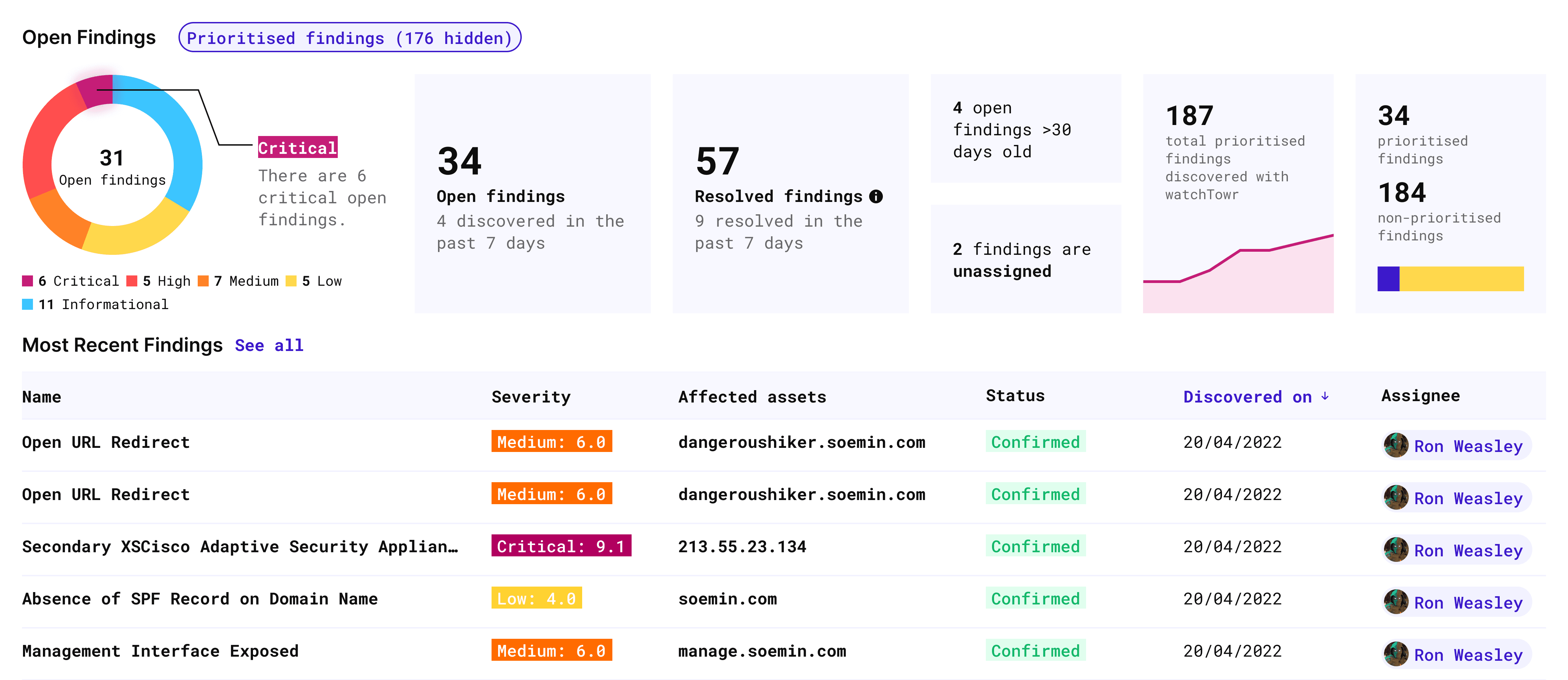
Continuous Assurance section: Open Findings, UI v2
Continuous Assurance refers to an automated engine that continuously tests the organisation's attack surface using real-world attacker tactics and vulnerabilities (aligned with MITRE ATT&ACK), creating actionable Findings for users to direct remediation efforts.. It validates exploitable weaknesses in real-time, ensuring ongoing security validation beyond one-off scans.
This update improves upon the MVP by establishing a clear left-to-right information flow guided by core user stories. The updated flow starts by delivering a concise overview and breakdown of open findings by severity. Then, it prioritises critical insights like open findings for immediate action while spotlighting stale risks such as unassigned findings or >30 day-old issues to eliminate blind spots. Each statistic functions as a quick link providing a clear path to action for users.
UI v2 Update 2
Consolidation of Secondary Information
Additionally, information secondary to the Attack Surface and Finding insights are reorganised neatly into a sidebar, showing module and hunt activity, as well as research findings by the watchTowr team to keep users up to date on breaking news in the world of cyber.
Version 3 Update: Deeper Insight & Visual Rebrand
As the platform's ASM capabilities evolved, we introduced greater sophistication to provide deeper, more granular insights.
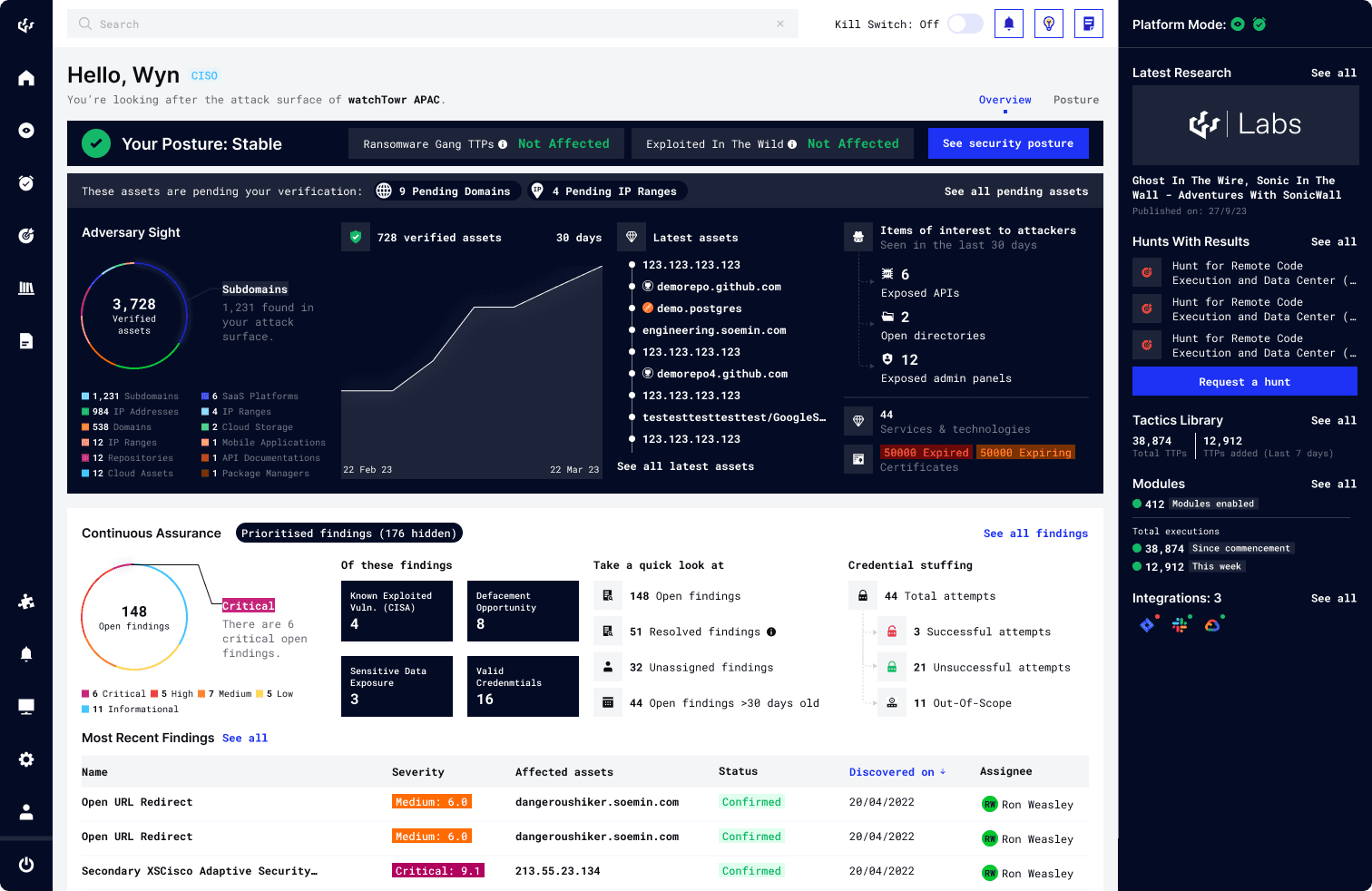
Attack Surface Dashboard: v3 update (2024-2025)
With the development of more features within the platform, we expanded the dashboard to surface richer insights for users. Apart from the visual refresh, 3 impactful changes to the dashboard are:
UI v3 Update 1
Visibility & Control: A More Comprehensive Adversary Sight
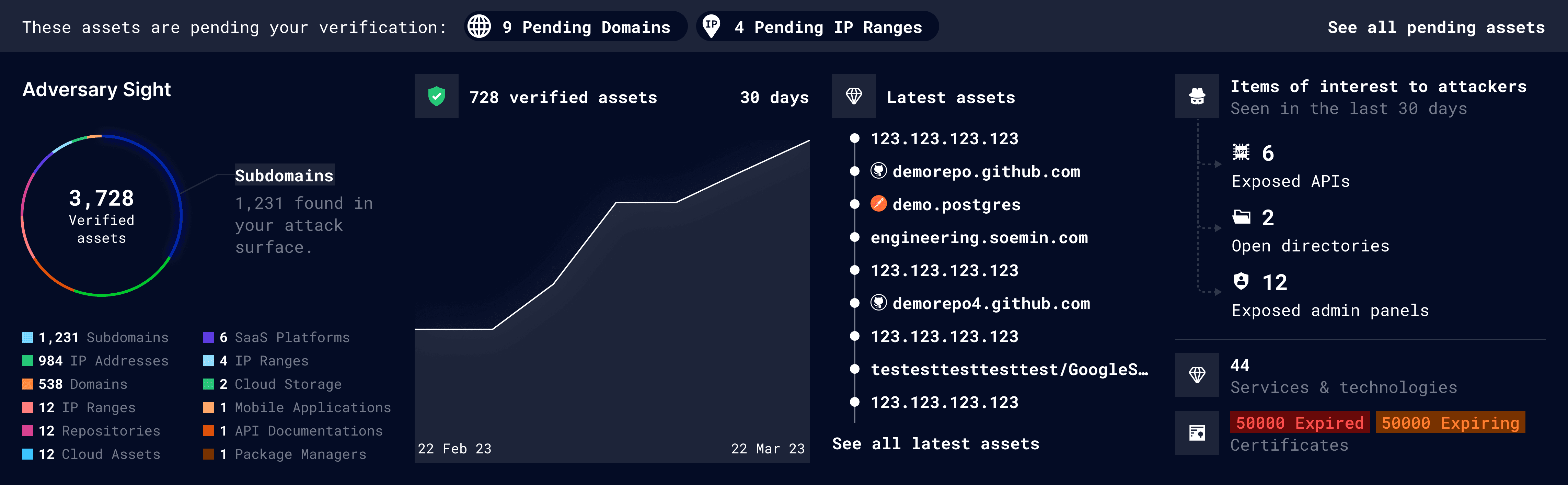
Adversary Sight section: After
With the latest update (above), users gain easier access to capabilities previously only accessible deeper into the platform that provides a clearer picture of their attack surface.
For example, the dashboard now includes an Items of Interest to Attackers section (rightmost).
Why? This gives users a consolidated view of potential exposure points, making it easier to prioritise remediation by impact.
The update also introduces alerts for assets pending verification (topmost banner).
Why? Unverified assets represent a blind spot — if they belong to the organisation, every day without verification is a day they remain potentially open to exploitation. Given the sheer volume of assets some organisations manage, surfacing this in the dashboard ensures nothing slips through unnoticed.
UI v3 Update 2
Continuous Assurance: Richer Insights
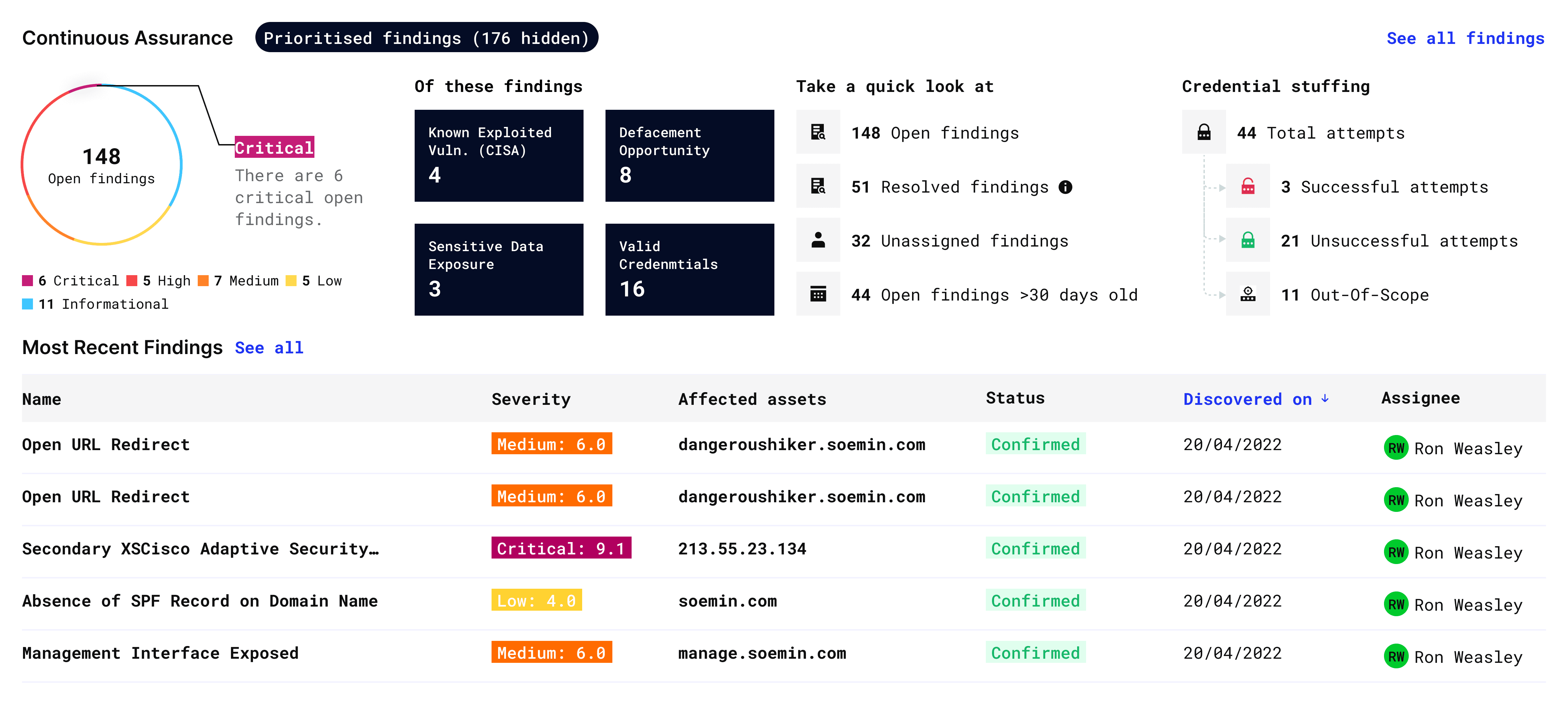
Continuous Assurance section: After
As capabilities evolved, we were able to build on earlier prioritization efforts with more effective, actionable insights — for example, highlighting findings with critical impact or identifying credential stuffing risks, such as active brute-force attempts on exposed login assets.
UI v3 Update 3
A Definitive Pulse Check: The Security Posture Update
With every design decision, we aim to answer the main overarching question: Is my organization compromised?
In this update, we introduced a dedicated segment that gives CISOs a clear, immediate answer — a definitive pulse check that surfaces this information at a glance.
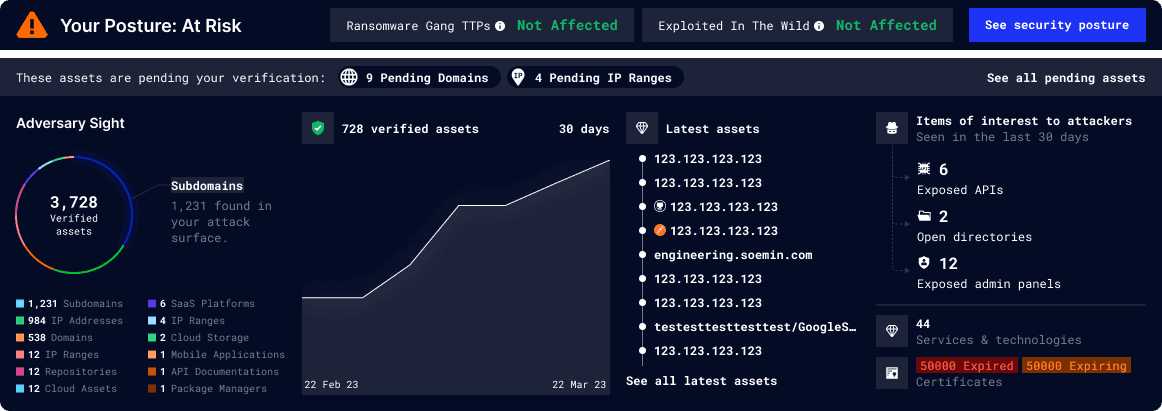
E.g. Security Posture: At Risk banner
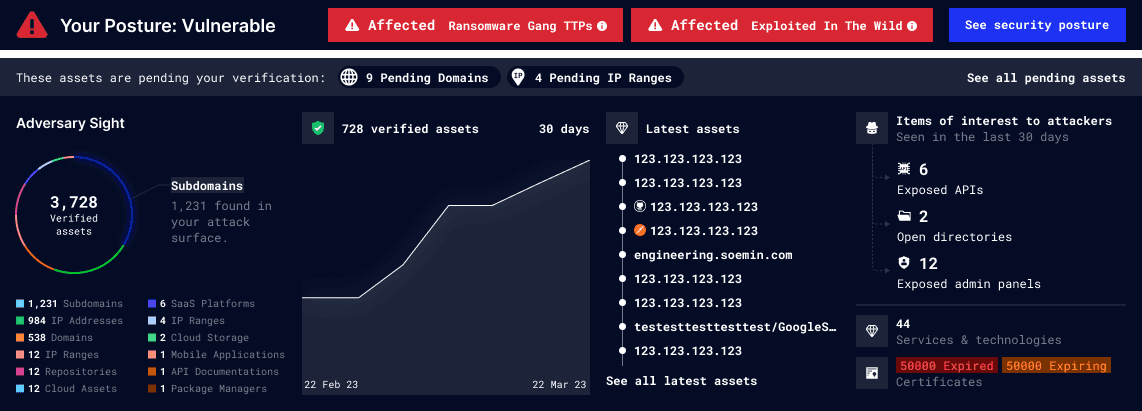
E.g. Security Posture: Vulnerable banner
Upon login, the security posture status appears prominently in the top-left of the dashboard's UI. It shows the latest update, status of critical vulnerabilities and a clear path to action, with states ranging from Stable to At Risk to Vulnerable.
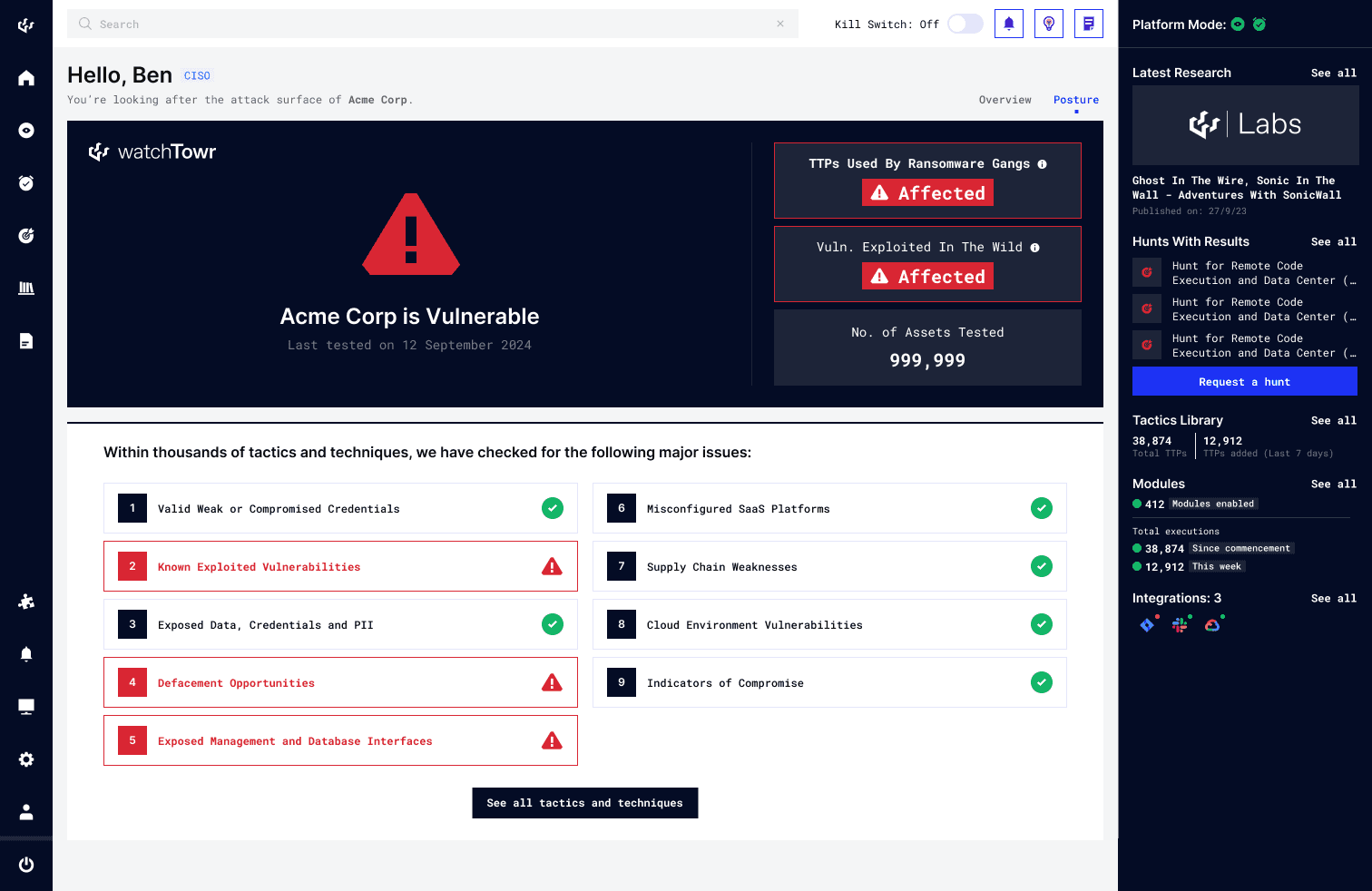
E.g. Attack Surface Dashboard: Security Posture view w/ Vulnerable status
The dashboard identifies and flags whether the organisation is compromised by the listed critical vulnerabilities relevant to its attack surface. This saves precious time spent on investigations, enabling immediate remediation efforts.
Allocating the security posture update to a separate dedicated section frees up space to present the data with more depth and clarity — avoiding the visual clutter that would come from surfacing it on the main dashboard, keeping the focus on key information.
Credits to my senior product designer, Shi — for leading this update of the db, integrating it with the main db
03
Closing Thoughts
Covering Bases
The Devil's in the Details — for a successful handoff, ensure that all edge cases are adequately fleshed out and included.
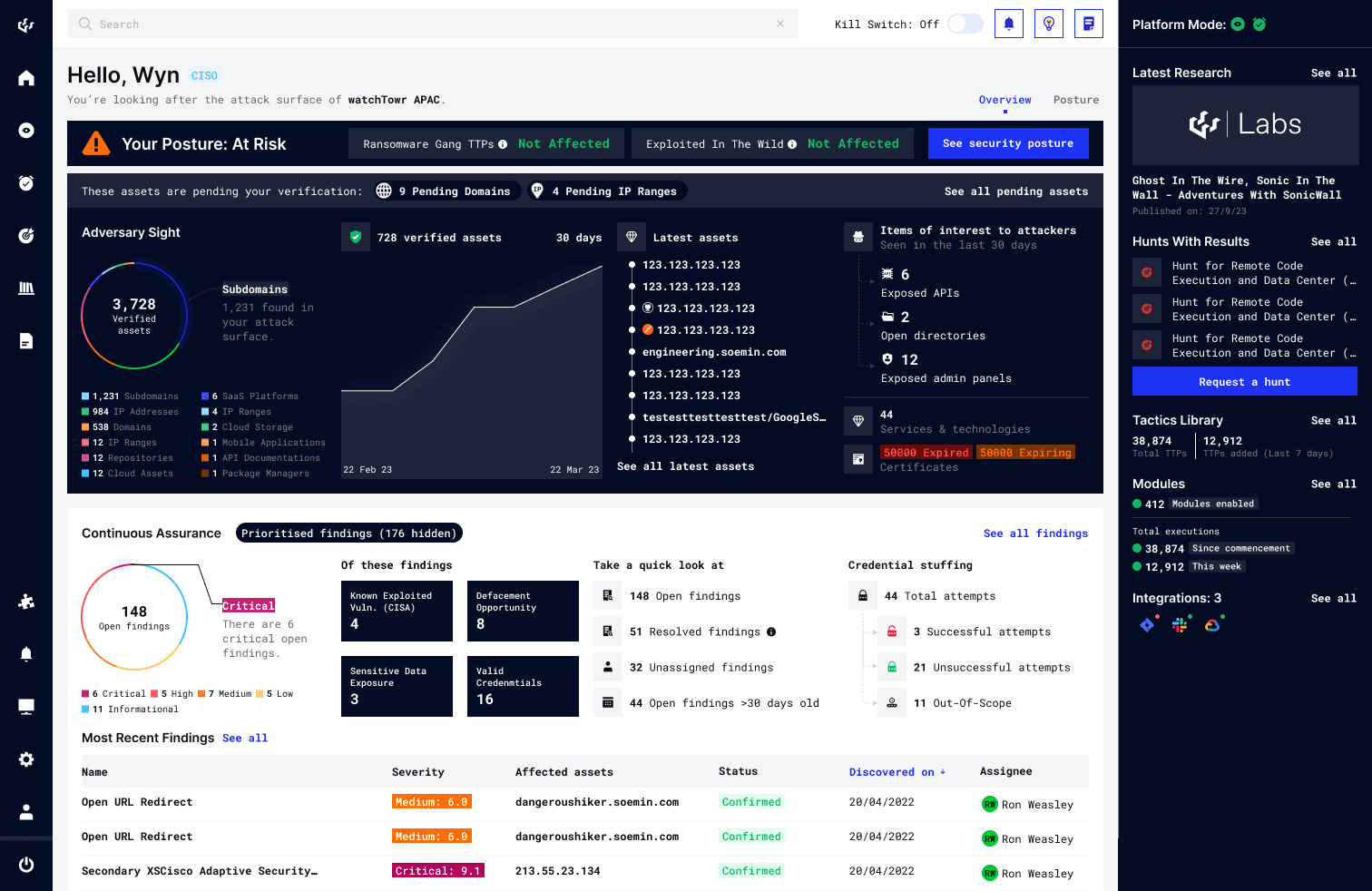
Latest Update for the Attack Surface Dashboard including Security Posture
Ensuring Feasibility - Shipping a feature of this complexity requires tight, ongoing alignment with the dev team to ensure the feasibility of the changes I propose. Knowing whether an API call will time out, a query will bottleneck, or a data request is even possible — before it hits production — is the difference between a smooth release and broken UX.
Time Management - Designing the main dashboard is only part of the picture. A lot of hidden time cost lies in the details — RBAC-driven views, BU-role dashboard views, empty and error states, POC configurations, onboarding flows, and edge cases that are easy to overlook and expensive to revisit. It's vital to build this time into your estimates early; it directly shapes handoff quality and feature delivery timelines.
Balancing UX, scalability, and design debt is an ongoing challenge—especially in a startup environment where sprint timelines are tight and feature roadmaps are rarely set in stone. With each feature, I do my best to design with the future in mind (e.g. in a scalable or modular way), knowing the UI will continue to evolve as the platform grows. It's a constant effort to find that balance, and something I refine with every sprint keeping the tradeoffs in mind.